Guides · Setup guide
Setting up the JoomSlot Kickstart package on a VPS
The all-in-one JoomSlot package was a Joomla 3.10.01 site in an Akeeba archive. Here's how it went onto a VPS in 2021, and what to watch if you restore any Kickstart archive now.
Archived product JoomSlot is no longer offered. Downloads, API keys, the game server and support are gone, so this page describes how version 1.0 worked in 2021.
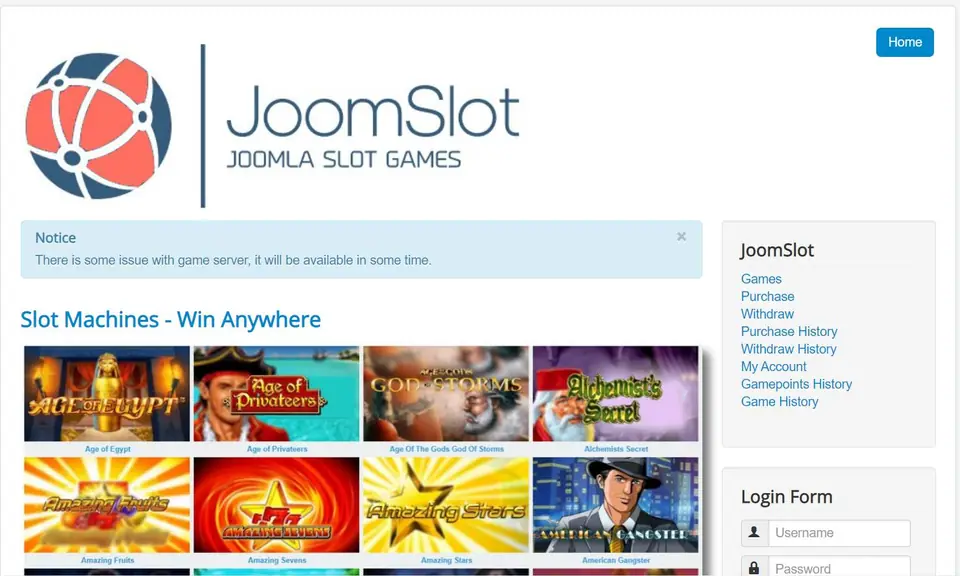
The screenshot at the top is where the old guide ended: a fresh Joomla 3 site with the JoomSlot logo, a lobby of slot tiles under "Slot Machines - Win Anywhere", a JoomSlot menu and a login form. It also carries a blue notice, "There is some issue with game server, it will be available in some time". That notice is still what the demo site says today. JoomSlot is retired and the package can no longer be downloaded, so read this as a record of how it was done in 2021.
What was in the package
One zip, Joomslot-v1-00.zip, containing two files: Joomslot-v1-0.jpa (an Akeeba Backup archive of a ready-made site) and kickstart.php (Akeeba Kickstart 7.0.7, the script that unpacks it). The site inside was Joomla 3.10.01 with the JoomSlot component, the jackpot module and the Bitcoin payment plugin, all version 1.0. After setup the back end was at your-domain/administrator with the user administrator and a password you chose during the restore.
The guide recommended a VPS or dedicated server (shared hosting as the minimum) and PHP 7.4. The rest of the requirements were Joomla 3's own: MySQL 5.5.3 or later recommended, Apache 2.4 or nginx 1.8.
Files and database
On the server, the guide made a web root, uploaded the zip, unpacked it and handed the folder to the web server user:

cd /var/www
mkdir example.com
cd example.com
unzip Joomslot-v1-00.zip   # apt install unzip if it's missing
rm Joomslot-v1-00.zip
cd ..
chown -R www-data:www-data example.com
Then a database and a user of its own:
CREATE USER 'newuser'@'localhost' IDENTIFIED BY 'a-long-random-password';
CREATE DATABASE databasename;
GRANT ALL PRIVILEGES ON databasename.* TO 'newuser'@'localhost';
FLUSH PRIVILEGES;
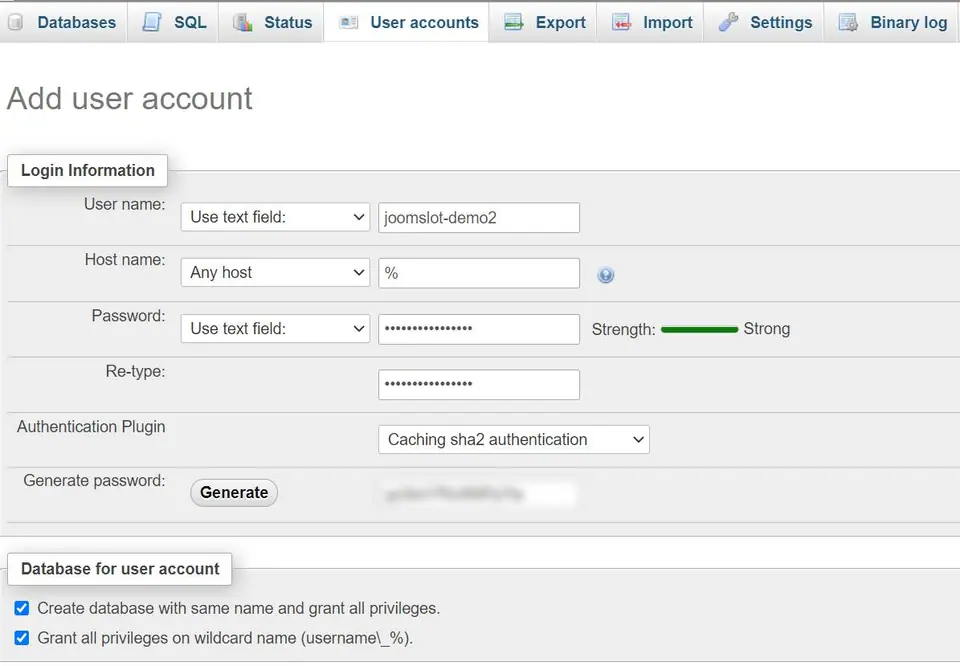
phpMyAdmin did the same job through User accounts > Add user account, with "Create database with same name and grant all privileges" ticked.
Web server
The nginx site file, cut down to the parts that mattered (the original also set cache headers for static files):
server {
    listen 80;
    server_name example.com;
    root /var/www/example.com;
    index index.php index.html;

    location / {
        try_files $uri $uri/ /index.php?$args;
    }
    add_header X-Content-Type-Options nosniff;
    # no scripts in writable folders
    location ~* /(images|cache|media|logs|tmp)/.*\.(php|pl|py|jsp|asp|sh|cgi)$ {
        return 403;
    }
    location ~ \.php$ {
        include snippets/fastcgi-php.conf;
        fastcgi_pass unix:/var/run/php/php7.4-fpm.sock;
    }
    location ~ /\.ht {
        deny all;
    }
}
Link it into sites-enabled, run nginx -t, then restart nginx. For Apache the guide used a plain virtual host. Its Order allow,deny lines were Apache 2.2 syntax; on 2.4 it should read:
<VirtualHost *:80>
    ServerName example.com
    DocumentRoot /var/www/example.com
    DirectoryIndex index.php
    <Directory /var/www/example.com>
        Options FollowSymLinks
        AllowOverride All
        Require all granted
    </Directory>
</VirtualHost>
Enable it with a2ensite and restart Apache.
The ten Kickstart steps
- Open your-domain/kickstart.php and press Esc to close the "things you should know" pop-up.
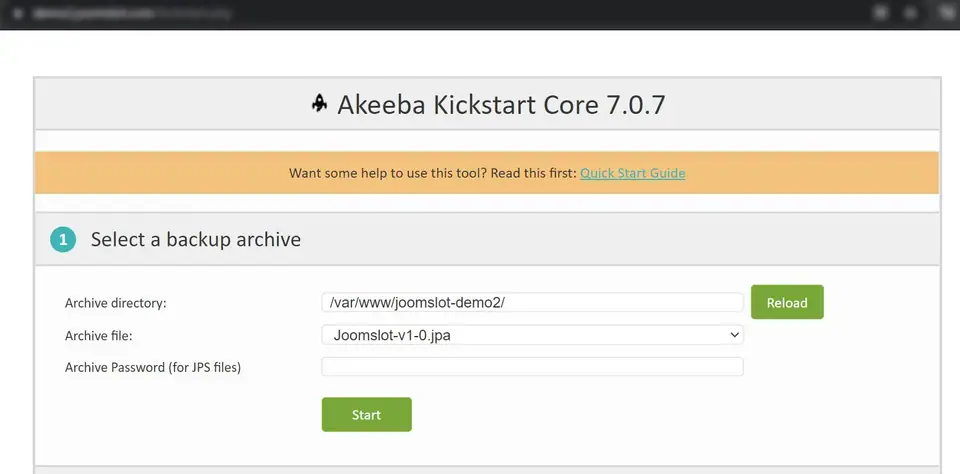
- Check the archive directory and the archive file, Joomslot-v1-0.jpa, then click Start.
- Click Run the Installer.
- Check the pre-installation list and click Next.
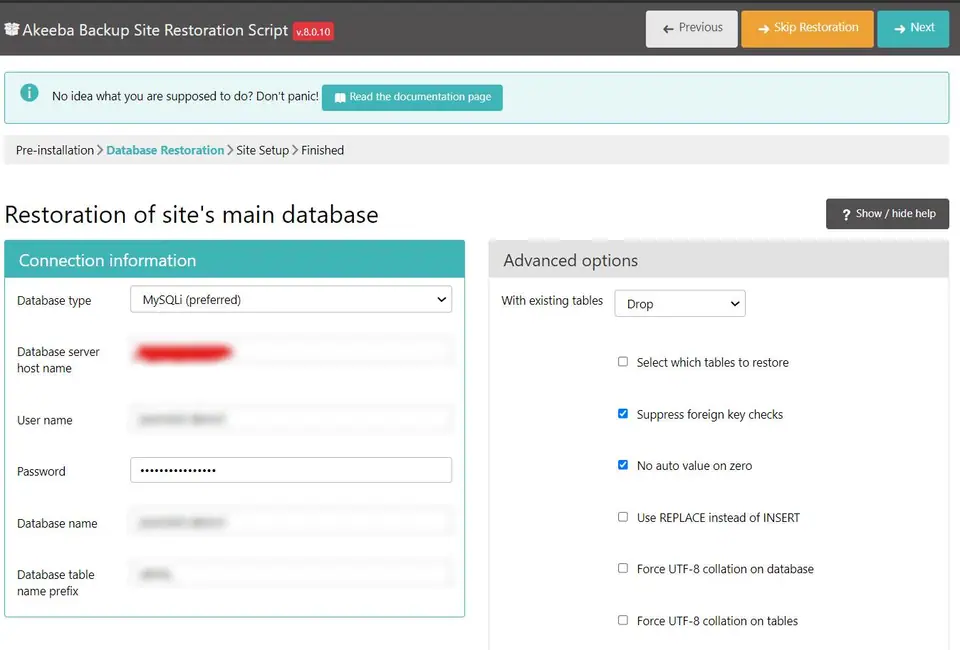
- Enter the database details (host usually localhost), set existing tables to Drop, then Next.
- Wait for the database restore to finish.
- Set the site name, site e-mail and the administrator password.
- Close the tab when it says "Almost there".
- Click Clean Up to delete the .jpa and kickstart.php.
- Visit the front end and the back end.
The API key and payment settings came after that, in the installation guide and the BTCPay plugin guide. The download page explains what else was offered, the backend guide comes next in the manual, and everything is listed under guides and on the JoomSlot product page.
If you restore any Kickstart archive today
Delete kickstart.php and the .jpa yourself and check they're gone; either one left in the web root lets a stranger rerun the restore or download your site. Don't build anything new on this stack either. Joomla 3 reached end-of-life in August 2023 and PHP 7.4 in November 2022, so neither gets security fixes.
If you only wanted to play slots, you'd need to get a game ID from a platform that still runs. You must be 18 or over, gambling is restricted in Malaysia, and a limit set before you play is the one that works: responsible gaming.
Questions people asked
Can I still get the JoomSlot Kickstart package?
No. The download closed with the rest of JoomSlot, and even a restored copy would show the game-server notice seen in the screenshot, because the games came from a remote server that has gone.
What should I delete after a Kickstart restore?
kickstart.php and the .jpa archive, both. Kickstart's Clean Up button does it, but check by hand. Left on the server, they let anyone rerun the restore over your site or download your whole site as one file.
Slot games are real-money gambling for adults 18+, and online gambling is restricted in Malaysia. Set a limit before you top up. Responsible gaming.