Guides · Admin guide
The Kennie.club payment plugin and the BTCPay store behind it
Three values in a Joomla plugin (Store ID, API key, IPN secret) tied JoomSlot to a BTCPay store. How they were set up, and why the hot wallet was the weak point.
Archived product JoomSlot is no longer offered. Downloads, API keys, the game server and support are gone, so this page describes how version 1.0 worked in 2021.
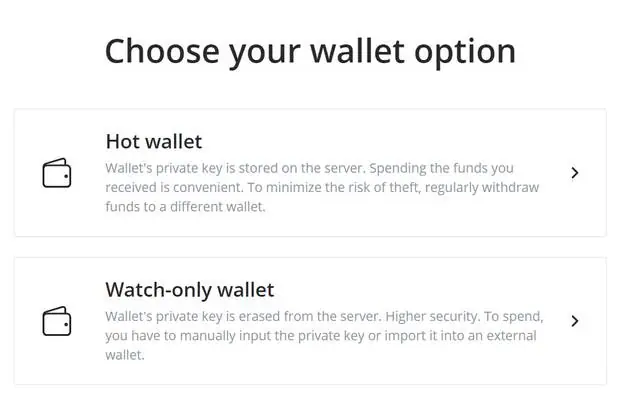
BTCPay Server asks a blunt question when you make a wallet: hot or watch-only. The hot option is described right there on the screen as keeping the wallet's private key on the server, with advice to withdraw regularly "to minimize the risk of theft". JoomSlot's payment setup used the hot one, because withdrawals had to be paid from somewhere. That choice is the main thing to understand about this plugin.
JoomSlot and Kennie.club are both gone, so none of this can be set up any more. This is the old manual, kept for reference.
The plugin in Joomla
The Bitcoin plugin came with the component. You found it under Extensions > Plugins by searching "kennie".
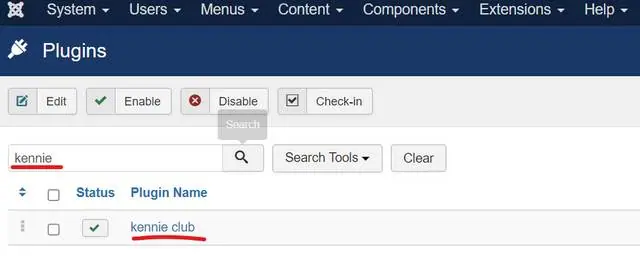
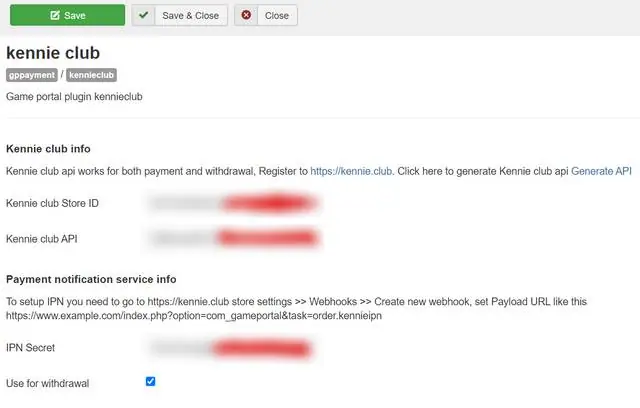
Its settings page held three values: Kennie club Store ID, Kennie club API and IPN Secret, plus a Use for withdrawal tick box. JoomSlot agents got these from a hosted BTCPay server called Kennie.club; webmasters running their own BTCPay server (the manual recommended this) copied them in from there.
On the BTCPay side
For your own BTCPay Server, the manual's order was:
- Create a store (the demo called it joomSlot.com).
- Set up a wallet for BTC on the store's General settings page, and enable "Allow anyone to create invoice" so the Joomla site could make invoices for players.
- Create a new wallet, choose Hot wallet, and pick an address type. The guide chose Segwit wrapped, for compatibility with older wallets.
- Write down the recovery phrase on paper. The old page published a screenshot of this step with the words readable; it isn't reproduced here, and if you ever used those words, that wallet should be considered burned.
- Copy the Store ID into the plugin.
- Add a webhook under the store's Webhooks settings, with the payload URL set to the JoomSlot IPN URL on your own domain. Copy its secret into the plugin's IPN Secret field.
- Generate an API key under your profile, copy it into the plugin.
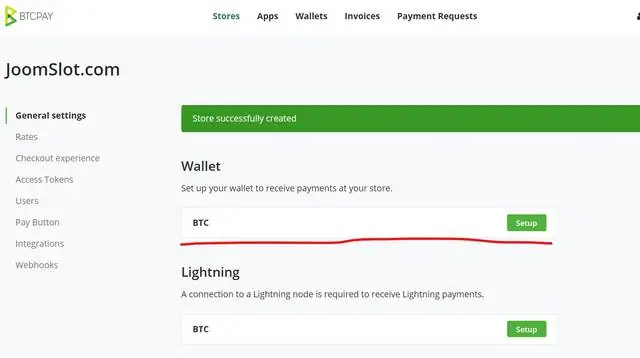
The API key in the guide was an unrestricted one. That's a key that can do anything your BTCPay account can, including sending money from the hot wallet. A key with only the invoice and pull-payment permissions the plugin needed would have been the safer choice.
Why the hot wallet was the weak point
On a shared server the risk is spelled out in yellow:
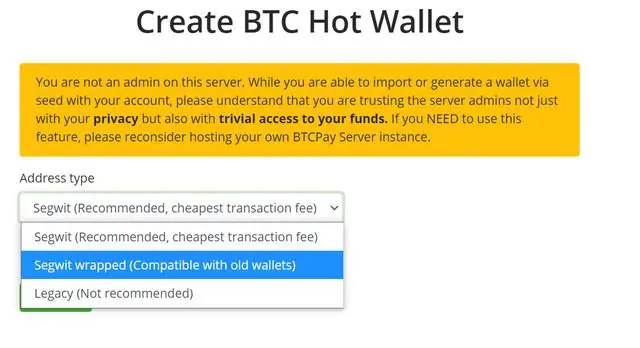
That's the Kennie.club arrangement: agents' money sat in hot wallets on a server someone else ran. Running your own server moves the trust to you, but the key still lives on an internet-facing machine next to a Joomla site. It's also worth being plain about the purpose. This wallet received players' Bitcoin for game credit and paid out their winnings, and running that without a gaming licence is illegal in Malaysia and most other countries.
How the payments looked from the admin screens is in the backend guide, and the player's side is in buying game credit and withdrawals. All guides are under guides; the JoomSlot product page has the background. If you just want to play, get a game ID from a platform that still runs.
18+ only. Gambling is restricted in Malaysia; set a firm limit before you start. More at responsible gaming.
Questions people asked
What was Kennie.club?
A hosted BTCPay Server that JoomSlot agents were given accounts on. It no longer resolves. BTCPay Server itself is open-source software you can still run yourself; see btcpayserver.org.
Is a hot wallet on someone else's BTCPay server safe?
No, and BTCPay says so on the screen: if you're not an admin on the server, its admins have trivial access to your funds. Even on your own server, a hot wallet keeps the private key on a machine connected to the internet.
Slot games are real-money gambling for adults 18+, and online gambling is restricted in Malaysia. Set a limit before you top up. Responsible gaming.